Windows
Halves, quarters, thirds, maximize and center on ⌃⌥ shortcuts. A switcher with live previews, and Dock previews across Spaces.
 Sonary
Download
Version 0.44.1 is out
Sonary replaces the little apps you keep installing: system monitor, window snapping, clipboard history, mouse fixes, screenshots and more. Free, open source, and every tool switches off completely when you don't need it.
DMG · Apple Silicon · macOS 26 Tahoe or newer · GPL-3.0
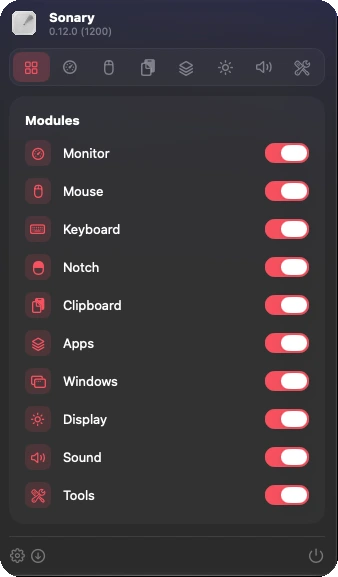
Ten modules, one switch each. A module that's off doesn't load, doesn't run in the background and never asks for permissions.
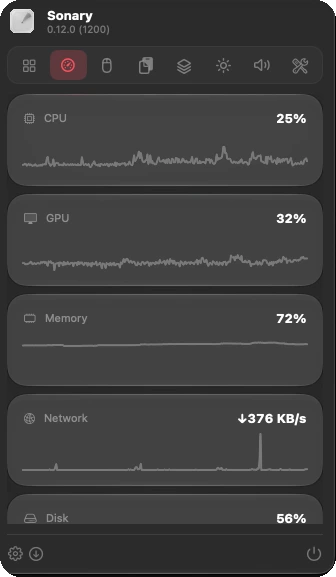
CPU, GPU, memory, network, disk, battery and temperatures, with history graphs, the busiest apps and alerts for sustained load.
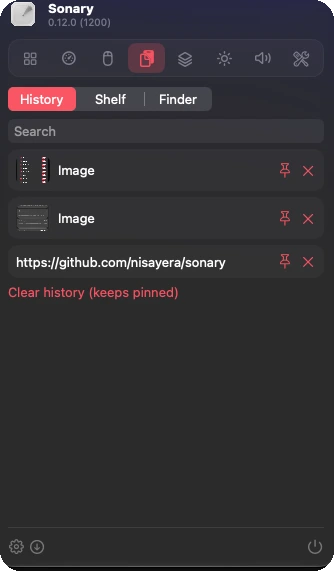
Clipboard history for text, images and files, with search and pinning. Plain-text paste on ⌘⌥⇧V, tracking junk stripped from links.
All ten modules ship in the current release.
Halves, quarters, thirds, maximize and center on ⌃⌥ shortcuts. A switcher with live previews, and Dock previews across Spaces.
Super Key: hold Caps Lock for all four modifiers, tap it for an action. Snippets with variables, every shortcut on one page.
Music, calendar, timers, downloads and accessory batteries around the notch, simulated on displays without one.
Command bar, offline text recognition, color picker, screenshots with an editor and scrolling capture, screen recording, scratchpad.
Linear or smooth scrolling, acceleration off, scroll direction independent of the trackpad, button mapping, double-click filter.
Uninstaller that finds leftovers, cleaner, force quit, port manager and Homebrew updates.
Switch output and input, mute the mic on ⌃⌥M, see which apps are playing, keep the Mac awake.
Brightness per display with shortcuts, and software dimming where macOS offers no control.
Sonary works offline. It goes online only to check for its own updates, and for the app update checker and speed test when you ask.
Accessibility or Screen Recording access is requested only when you enable a module that needs it.
GPL-3.0-or-later on GitHub. Read every line, build it yourself, or send a pull request.
The short version, straight from the app.
Get the latest Sonary-0.44.1.dmg, open it and drag Sonary into Applications.
Open Sonary from Applications. Because Sonary isn't notarized by Apple yet, macOS blocks the first launch with a warning. Click Done (not Move to Trash).
Go to System Settings → Privacy & Security, scroll down to Security and click Open Anyway next to the Sonary message. Confirm with Touch ID or your password, then click Open. You only do this once.
Sonary now opens like any other app, checks for new versions itself and updates in one click.
git clone https://github.com/nisayera/sonary.git
cd sonary
brew install xcodegen
xcodegen generate
open Sonary.xcodeproj
Requires Xcode 26.
Panel sections now open and close on their own.
Panel without scroll bars, Keep Awake as its own module, DDC brightness for external displays, app icon in the panel header.
A livelier panel with live values, badges, rings and tool tiles. Accent colour and panel options, power and battery details, notch opens on hover or click, custom timer presets, separate download/upload lines in the network graph. Fixes a crash when opening the Sound tab.
Shelf at the pointer, input level and device priority, windows in the command bar, floating scratchpad, capture modes with crop, watermark and sound in recordings, App Store updates and Homebrew installs, month calendar in the notch, per-core load and battery health, wallpaper gallery, quick panel of favourite tools, data export and reset.
New panel and settings layout, ⌘Tab takeover for the window switcher, per-axis scroll reversal, wheel zoom, snippet triggers, clipboard quick panel. Settings now survive updates.
Fixed Space order, three-finger middle click, extra brightness, Dock click actions and window previews, microphone level and camera in the notch, screenshot editor, scrolling screenshots, files and scripts in the command bar.
Screen recording, media tools, speed test, disk image installer, one page for every keyboard shortcut, GIFs from videos, a file shelf in the notch and Sonary's own capture selector with magnifier.
Super key, notch gestures, window switcher, brightness, quick toggles, radial menu, clipboard images, fan speeds, scheduled cleaning. Releases signed with a stable certificate so permissions survive updates.
Window layouts on shortcuts and quit protection, audio output/input switcher, mic mute shortcut, keep awake, command bar, OCR, colour picker, screenshots, scratchpad and snippets.
Notch island (music, calendar, timer, downloads, batteries), clipboard history with link cleaner, and the Apps module: cleaner, uninstaller, quit apps, port manager, Homebrew updates.
Final app icon, tabbed menu panel, card-based settings, icon-only menu bar by default, automatic releases.
Mouse module: smooth scrolling, acceleration, buttons, click filter and per-app exceptions. New sonar app icon.
First release: system monitor with alerts and menu bar readout, module registry, onboarding and in-app updates via Sparkle.
Yes. Sonary is GPL-3.0-or-later open source, with no subscription and no paid tier.
Macs with Apple Silicon on macOS 26 Tahoe or newer. Intel Macs and older macOS versions aren't supported.
Sonary isn't notarized by Apple yet, so Gatekeeper blocks the first launch. After you've tried to open it, go to System Settings → Privacy & Security and click Open Anyway, then Open. Apple explains this in Safely open apps on your Mac. You don't need to turn off Gatekeeper.
A disabled module doesn't load and doesn't run in the background. Turn on only what you use.
Sonary is in early development. All ten modules ship today, and every milestone is its own release until 1.0. The feature checklist shows what's done and what's open.
English and German.